
Problem overview
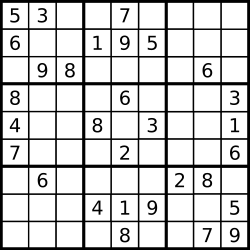
The method solveSudoku receives a 9 by 9 Sudoku board as [[Character]], where each cell is a digit from "1" to "9" or "." for an empty cell. It must fill every empty cell so that each row, each column and each of the nine 3 by 3 boxes contains the digits 1 to 9 exactly once. The puzzle is guaranteed to have exactly one solution, and the method returns the solved board.
The statement's example starts with ["5","3",".",".","7",".",".",".","."] as its first row, and the completed first row is 5 3 4 6 7 8 9 1 2. Here is how the example board comes out, one string per row:
534678912
672195348
198342567
859761423
426853791
713924856
961537284
287419635
345286179
Approach: guess, recurse, undo
The solver visits cells in reading order: left to right across a row, then the next row. At a cell that already has a digit, it simply moves on. At an empty cell, it tries the digits 1 to 9 in turn. A digit is allowed only if it doesn't already appear in the cell's row, column or box. When a digit is allowed, the solver writes it into the board and continues with the next cell. If that path eventually fails, control comes back, the solver erases the digit and tries the next one. This is backtracking: make a choice, explore the consequences, undo the choice.
When the position moves past the last row, every cell has been filled legally, so the board is a solution. Because the puzzle has just one, the search can stop at that point. But "stop" needs care. The calls that are waiting on the stack would otherwise carry on trying other digits and undoing them, which would erase the solution from the board. The lesson's way out is a property called result. When a solution is found, a snapshot of the board is saved there. Every call checks result first and returns at once if a solution is saved, so the remaining calls unwind without doing any work.
Step by step
- Add a property
resultof type[[Character]]?, starting asnil. It holds the solved board once one is found, andnilmeans "not solved yet".solveSudokuresets it tonilat the start. - Start the search at the top-left cell:
self.backtracking(0, 0, &board). - Return
self.result!. The!unwraps the optional, which is safe because a solution has been saved. - Declare
backtrackingwith arow, acoland the board as aninout [[Character]]. - Stop conditions. If
resultis notnil, return. Ifrow == 9, the board is complete, so callsaveBoard(board)and return. - Find the next cell with
getNextCelland keep its row and column asnewRowandnewCol. - Skip given digits. If
board[row][col]is not".", recurse on the next cell and return. - Try the digits. Loop over the characters of
"123456789". IfisValidaccepts the digit, write it into the cell, recurse on the next cell, then write"."back. - Write
saveBoard: setresultto an empty array and append each row of the board to it. - Write
getNextCell: if the column is 8, the next cell is column 0 of the next row, otherwise the next column in the same row. - Write
isValid: loop over all 81 cells(i, j). A cell conflicts if it holds the candidate digit and lies in the same row or column as(row, col), or in the same box. Two cells share a box whenrow / 3 == i / 3andcol / 3 == j / 3. Returnfalseon any conflict,trueotherwise.
The solution in Swift
class Solution {
    func isValid(_ board: [[Character]], _ row: Int, _ col: Int, _ val: Character) -> Bool {
        for i in 0..<9 {
            for j in 0..<9 {
                let usedValue = board[i][j] == val
                let sameRowOrCol = row == i || col == j
                let sameRowBox = row / 3 == i / 3
                let sameColBox = col / 3 == j / 3
                let sameBox = sameRowBox && sameColBox
                if usedValue && (sameRowOrCol || sameBox) {
                    return false
                }
            }
        }
        return true
    }
    func getNextCell(_ row: Int, _ col: Int) -> [Int] {
        if col == 8 {
            return [row + 1, 0]
        }
        return [row, col + 1]
    }
    func saveBoard(_ board: [[Character]]) {
        self.result = []
        for i in 0..<board.count {
            self.result!.append(board[i])
        }
    }
    func backtracking(_ row: Int, _ col: Int, _ board: inout [[Character]]) {
        if self.result != nil {
            return
        }
        if row == 9 {
            saveBoard(board)
            return
        }
        let newRow = getNextCell(row, col)[0]
        let newCol = getNextCell(row, col)[1]
        if board[row][col] != "." {
            self.backtracking(newRow, newCol, &board)
            return
        }
        for val in "123456789" {
            if self.isValid(board, row, col, val) {
                board[row][col] = val
                self.backtracking(newRow, newCol, &board)
                board[row][col] = "."
            }
        }
    }
    var result: [[Character]]? = nil
    func solveSudoku(_ board: inout [[Character]]) -> [[Character]] {
        self.result = nil
        self.backtracking(0, 0, &board)
        return self.result!
    }
}
The Swift details worth a closer look:
Character, notStringorInt. The board is[[Character]], so a literal such as"."is read as aCharacterwhere the context asks for one. Looping withfor val in "123456789"goes over the characters of the string, which is whyvalcan be written straight into the board and passed toisValid.- Optional
result. A type followed by?can holdnilas well as a value.self.result != niltests for a saved solution, andself.result!unwraps it. If no solution had been saved, that!would stop the program, but the guarantee of exactly one solution prevents that here. Writingself.result!.append(...)insaveBoardis safe because the line just before assigns[]. - Value semantics make the snapshot work. Arrays copy when assigned, so the rows appended to
resultare independent copies. Later writes of"."toboarddon't alter the saved solution. After the call,boardis back to the puzzle that was passed in, and the solution lives only in the returned value. inoutand&.boardis passed as&boardthrough the recursion so every call edits the same grid. The helpersisValidandsaveBoardtake it as an ordinary parameter, which only reads it.- Integer division.
row / 3truncates, so rows 0 to 2 map to 0, rows 3 to 5 to 1, and rows 6 to 8 to 2. Two cells are in the same box when both their row index and their column index map to the same value. - Properties can be declared after use.
resultis declared below the methods that use it, which is fine inside a class.
Complexity
Time: exponential in the worst case. With e empty cells there are up to 9^e digit sequences, and the search visits only the ones that survive the validity test. Real puzzles prune very hard, so they solve quickly. The test in isValid scans all 81 cells each time, a fixed cost per attempt, which is larger than the 27 cells it actually needs.
Space: O(1) beyond the board. The recursion is at most 81 calls deep, and the saved snapshot holds 81 characters. These sizes don't depend on the puzzle, because the board is always 9 by 9.
Edge cases and common mistakes
- Already-filled cells. The solver moves on without testing them. The recursion has to return after that call, or the code would try to overwrite the clue with other digits.
- Forgetting to undo. Without
board[row][col] = ".", a failed guess stays on the board and blocks the correct digits later. - No early stop. Without the check on
result, the search would finish the whole tree even after finding the answer. For a puzzle with one solution that wastes time, and only the snapshot saves the answer. - Saving too late. The undo steps erase the digits as the recursion unwinds, so the snapshot has to be taken when the position reaches row 9. Swift copies the arrays on assignment, which keeps the snapshot safe from those later writes.
- Comparing digits as numbers. A
Charactersuch as"5"can't be compared with the integer 5. Keep both sides asCharacter. - Mixing up the box test. A cell is in the same box only if both the row block and the column block match. Testing just one of them marks whole bands of three rows or columns as conflicts.
- A puzzle with no solution. The final
self.result!would fail. The statement guarantees one solution.
Testing
- The example puzzle in the statement returns the nine strings shown at the top of this article, row by row.
- After the call, the board that was passed in is back to the original puzzle, and the solution is in the return value.
- A board that is already complete returns itself, because every cell is skipped and the position reaches row 9.
